

ServiceNow-Jira Integration: Methods, What to Sync, and How To Set It Up in 2026
ServiceNow and Jira serve different functions but overlap in workflows like ITSM and software development. In most organizations, these tools aren’t integrated, meaning someone has to manually copy and paste updates back and forth between them or teams have to communicate exclusively in other channels.
In this guide, you’ll learn about integrating ServiceNow and Jira, including what options you have available, what you can sync, and common use cases.
Market overview: ServiceNow-Jira integration
| ServiceNow’s Jira Spoke | One-way automation (e.g., Zapier) | Two-way sync (e.g., Unito) | |
| Sync direction | Primarily one-way, inbound to ServiceNow. Two-way syncing requires custom webhooks and Flow Designer work. | One-way, trigger-based automation. | Two-way. |
| Real-time or batch | Real-time. | Real-time. | Real-time. |
| Field mapping depth | Standard fields supported via Flow Designer. Custom fields and reference fields usually need scripting. | Standard fields; custom fields and attachments usually not supported. | Standard fields, custom fields, comments, attachments, hierarchy mapping. |
| Setup time/effort | High. Requires Flow Designer expertise, business rules, and scripts for anything beyond simple inbound flows. | Low. No-code with limited configuration. | Low. No-code setup. |
| Best for | Teams already on ServiceNow needing basic, simple inbound Jira connectivity. | Simple visibility and handoffs. | Seamless collaboration across teams. |
What you can actually sync between ServiceNow and Jira
ServiceNow-Jira integrations aren’t all created equal. One of the main differences between them is integration depth (i.e., how much data they can sync).
Work item previews
This is the most basic level of integration. Instead of actually moving data from Jira into ServiceNow (or vice-versa) integrations at this level only give you a snapshot of what’s happening in one tool. A Jira work item, for example, might show up in ServiceNow as a panel that shows little more than the name of the work item, its status, and its assignee. You can’t update anything in Jira by making changes in ServiceNow. This level of integration is suitable for workflows that only need extra visibility rather than seamless collaboration between tools.
Standard fields
Most integrations go beyond just showing work item previews to supporting some, if not all, standard fields. “Standard” means the field is built right into the tool, with little to no configuration or customization. Fields like due dates, assignees, and descriptions are all examples of standard fields. Integrations can map similar fields between ServiceNow and Jira automatically while others, like statuses, might need some transformation between tools.
Custom fields
Both ServiceNow and Jira have custom fields that allow you to customize them to your specific workflows. Jira’s custom fields include single-select, multi-select, text, number, date picker, user picker, and more. ServiceNow custom fields include choice, reference, table, and date/time fields.
Not all integrations support custom fields. When researching an integration solution for ServiceNow and Jira, consider whether it can handle some, most, or all of the custom fields you need.
Comments and notes
Comments and notes are essential to your workflows; they’re how you communicate on projects, manage handoffs, and get essential context. A developer’s comment might request specific context before their work can begin, a customer support agent’s note might give insights into ticket priority, and so on. Some integrations don’t support comments and notes, which means your teams will have to come up with workarounds to communicate outside of Jira and ServiceNow.
Attachments
Attachments allow teams to share deliverables, briefs, screenshots, and more. Attachment support isn’t default with most integrations, and the way an integration solution handles attachments is almost as important as having support at all.
Unito, for example, can support attachments in three different ways, depending on the integration you’re using:
- Linked attachments create a hyperlink in synced work items. Clicking on the link opens the original attachment in the tool it came from.
- Copied attachments make the exact same file visible in multiple tools.
- Streamed attachments create a unique webpage for each attachment, accessible independent of either tool.
Hierarchies
Both ServiceNow and Jira have hierarchies, which are relationships between levels of work items. ServiceNow, for example, can have user/manager hierarchies, nested location fields, business application to server hierarchies, and more. Meanwhile, Jira has a default hierarchy of Epic→Work Item→Sub-task, but you can also build your own. For example, a custom Jira hierarchy might be Theme→Feature→Epic→Story→Bug→Sub-task.
Integration platforms that don’t support hierarchies treat all work items exactly the same, which makes it difficult to track workflows across tools.
The 4 most common methods for setting up a ServiceNow-Jira integration
ServiceNow’s Jira Spoke
The Integration Hub is ServiceNow’s built-in platform for integrating with tools like Jira. Pre-built spokes frame most of each integration’s capabilities, though extra coding, budget, and time are usually required to deploy them if you have more complex needs. ServiceNow’s Jira Spoke brings data from Jira into ServiceNow, in just one direction, by default. But with custom development work, you can set up a two-way sync between ServiceNow and Jira.
The ServiceNow Integration Hub supports over 175 Spokes (i.e., tools) and thousands of actions. Pre-built templates can handle common use cases, like notifying teams of work happening in other tools, sharing documents, managing access, and more.
Because the Integration Hub is embedded in ServiceNow, it’s a common first choice for integrating ServiceNow and Jira. But it takes a significant amount of customization to support more complex workflows.
Best for: Ticket escalations and software development workflows in organizations that have IT resources for extensive customization.
One-way automation (e.g., Zapier)
Third-party automation tools like Zapier use trigger-action logic to handle automations across ServiceNow, Jira, and hundreds of other tools. The actions you can automate with Zapier include creating work items in Jira to match records in ServiceNow or updating a specific field in ServiceNow when a similar field is changed manually in Jira.
One-way automations are best-suited for managing linear workflows, like approvals, escalations, and other handoffs. Because they cover such a wide range of tools, they can be broadly applicable across your organization, not just for pairing ServiceNow and Jira.
The automations you can build with these tools are relatively simple, typically covering a single action. Either it creates a work item or updates a single field. Covering an entire workflow with these integrations usually requires chaining multiple automations together.
Best for: Automating simple handoffs between ServiceNow and Jira with little need for back-and-forth.
RPA platforms
RPA stands for robotic process automation. These platforms allow users to automate even complex workflows with software bots that can take the same actions humans can. They can even interact with the interfaces of other software tools. That makes them sound like the perfect way to integrate ServiceNow and Jira, except for one word.
Maintenance. Even a slight change in a tool’s interface can completely break your bots, meaning you need to troubleshoot them regularly.
Two-way sync (e.g., Unito)
A two-way (or bidirectional) sync platform like Unito creates relationships between Jira work items and ServiceNow records, keeping everything up to date as you work. Work items are created automatically to match the ones you manually open in your tools, and fields are updated constantly as you work.
Two-way sync platforms typically offer deep integrations that cover most standard and custom fields. They usually also support attachments, comments, and more. Some even maintain hierarchies and relational fields between ServiceNow and Jira. These deep integrations can support simple and complex workflows, from approvals to cross-department handoffs and true cross-functional collaboration.
Best for: Working seamlessly across ServiceNow and Jira with full visibility and no doubling up on tool licenses.
Use cases for a ServiceNow-Jira integration
Customer support ticket escalation
When customer support agents run into tickets they can’t handle, the tickets are escalated to a more technical team, like software developers or IT professionals. These teams typically work in different tools, meaning the initial ticket might be handled in ServiceNow while technical teams will work on it in Jira. The gap between these tools is where important context and follow-ups go missing. Integrating ServiceNow and Jira closes that gap and improves collaboration between these teams.
ITSM
ITSM has similar challenges as customer support ticket escalation, with success metrics often being based on the speed at which tickets are resolved, the number of tickets resolved in a specific period, and the smoothness of escalations. A ServiceNow-Jira integration doesn’t just make escalations smoother, it ensures all the context a ticket has in ServiceNow lands in Jira without any manual copying and pasting. Tickets land in Jira, where IT teams can work on them, and when they’re closed, teams working in ServiceNow find out automatically.
Incident management
Responding promptly to incidents is an essential ITSM responsibility. But when incidents need to be escalated from first-level agents in ServiceNow to developers in Jira, the handoff creates its own problems. Response and resolution requirements from SLAs might not be met during escalations, as information like incident states doesn’t carry over automatically.
Change management
For developers in Jira, a change in process or systems is often straightforward. A request is made, it’s evaluated, and it’s implemented. Service desks using ServiceNow rely on ITIL change management and a more rigorous workflow. An integrated system for change management within your organization ensures any internal transition is properly documented, approved, and communicated quickly.
DevOps coordination
By linking Agile release management in Jira with ITIL operational tracking in ServiceNow, your organization can foster better DevOps practices.
AI context
Both ServiceNow and Jira have built-in AI agents that take action autonomously based on data in these platforms. But they both have one main limitation; they only have access to the data in their own platforms. Jira’s Rovo agents only pull from Jira work items. ServiceNow AI only pulls from ServiceNow records. An integration between these tools makes that context broadly available to all your AI agents, meaning they’re more accurate and they’ll succeed on more tasks.
These use cases illustrate just how integral a well-configured synchronization between ServiceNow and Jira can be for optimizing your business operations. The key is speed and efficiency in all cases.
Whether you wish to deploy a faster incident management process, IT change management system, or to fulfill cross-departmental requests automatically, integration makes a difference.
This is especially true when it comes to cyber threats when every second of response time counts. Automating tedious manual tasks enables your team to spend more of their effort on problem-solving and using their primary skill sets.
Setting up a two-way sync with Unito
Unito simplifies ITSM workflows, addressing these challenges head-on:
- Quick configuration: Unito’s low-code setup means you’ll be up and running quickly. Intuitive configuration tools let you tailor the data flow to your specific ITSM processes.
- Error reduction: Automated syncing eliminates manual updates, significantly reducing the risk of mistakes and data discrepancies.
- Granular control: Fine-tune field mapping and syncing rules to ensure only the necessary information is shared between Jira and ServiceNow. This balances visibility with data control.
- Enhanced visibility: Everyone involved, from IT service agents to those in other departments, sees the full up-to-date picture, promoting faster resolution.
- Team management: The Unito team can help you put together a permission model to help you manage your workspace(s) effectively.
Connecting ServiceNow to Unito for the first time
A ServiceNow admin needs to set up the initial connection between Unito and your ServiceNow account. From there, you can authorize Unito to sync data out of ServiceNow using OAuth 2.0 or a username and password.
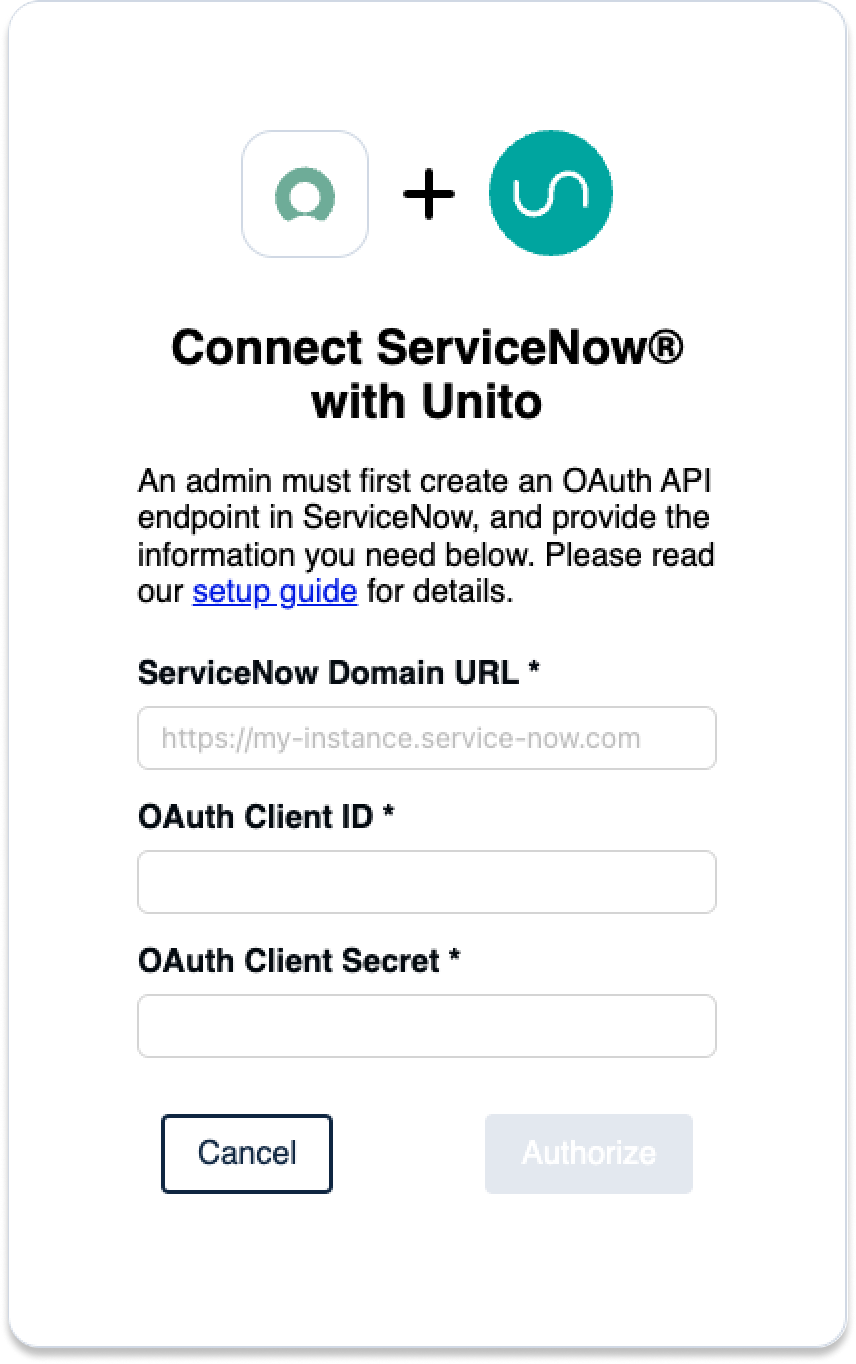
Make sure you have the following information on hand to connect your account:
- ServiceNow Domain URL: https://INSTANCENAME.service-now.com
- OAuth 2.0: An OAuth Client ID and Secret
- Username: Your ServiceNow username and password
Before you sync
You need to connect a ServiceNow account with CRUD rights (create, read, update, and delete) for the records and tables you plan on syncing to Unito. If you’re not sure how to do this, contact your ServiceNow admin for guidance.
Setup in Jira
If you’re connecting Jira to Unito via OAuth2, then simply follow the on-screen instructions when adding your account for the first time:
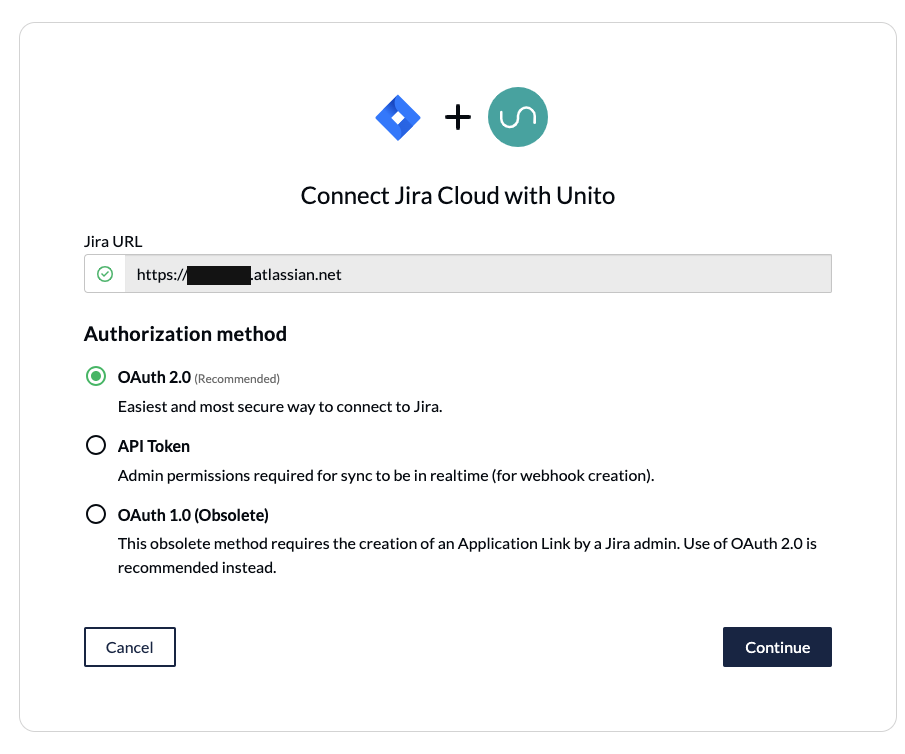
If you’re not using OAuth 2 to connect to your Jira Cloud workspace, you’ll need to do the following:
- Set your Jira contact email visibility to anyone in your Jira profile page.
- Set up an application link in Jira to sync your issues to ServiceNow.
If you’re connecting an on-premise Jira Server instance to Unito, you’ll need to follow this guide. You can also use ngrok to connect Jira Server to Unito.
Step 1: Connect ServiceNow and Jira to Unito
- Sign up for Unito.
- Click +Create Flow in the Unito app.
- Click Start Here to connect ServiceNow and Jira.
- Click +Choose account for each tool and complete the authorization process.
- Choose the type of ServiceNow record you want to include in your flow. Unito supports all record types, including requests and incidents.
- Choose the ServiceNow table and Jira project you want to sync.
- Once that’s done, click Confirm.
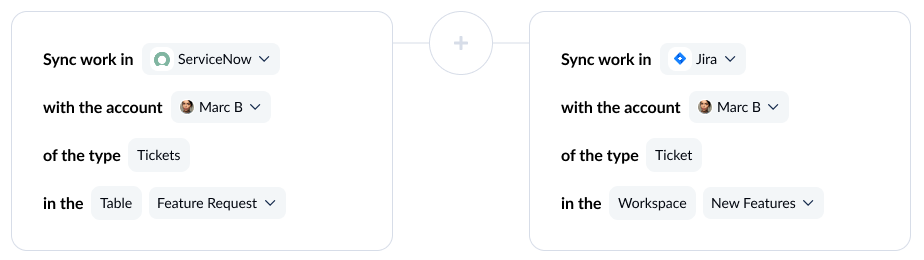
First time connecting tools to Unito? Check out our in-depth guide.
Step 2: Choose flow direction
With flow direction, you determine where Unito automatically creates work items to match those you create manually. You have three options:
- 2-way: Both ServiceNow records and Jira issues are automatically created by your Unito flow to match the items your team creates manually in each tool.
- 1-way from ServiceNow to Jira: Jira issues will be automatically created by Unito to match ServiceNow records you create manually. Unito won’t create new ServiceNow records.
- 1-way from Jira to ServiceNow: ServiceNow records will be automatically created by Unito to match Jira issues you create manually. Unito won’t create new Jira issues.

Here’s a more detailed guide to how flow direction works.
Step 3: Build rules to sync specific work items
Unito rules can do two things:
- Filter out work items you don’t want to sync. For example, you could create a rule that only syncs records set as High priority.
- Automating certain actions. For example, you could create a rule that automatically assigns new Jira issues to a specific user.
To start building your rule, click Add a new rule, then choose a trigger and action.
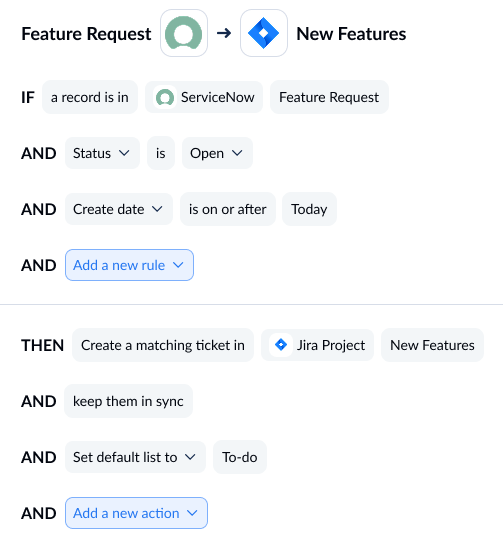
You can learn more about setting rules here.
Step 4: Map fields between ServiceNow and Jira
Unito uses a visual field mapping interface, with dropdowns that show you which field combinations are possible. If you’re used to writing JQL queries to filter Jira issues, you’ll find Unito’s visual mappings just as powerful but easier to configure and maintain.
When you map fields, you pair fields in ServiceNow with fields in Jira so data always goes right where it needs to be. Unito can usually map most fields automatically, whether they’re exactly the same (Assignee→Assignee) or compatible (URL→Text). You can also choose to map fields manually to fully customize your flow.
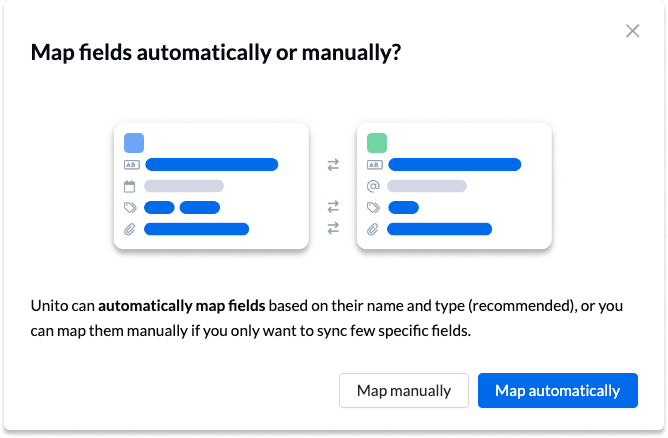
Here’s what you’ll see when Unito maps your fields automatically.
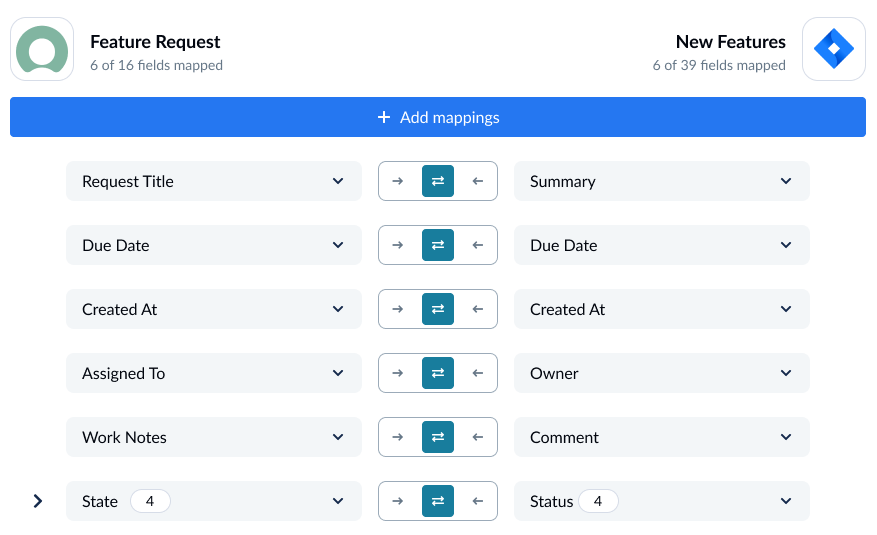
To add a new field mapping, click +Add mapping then Select a field. When you choose the field you want to map in one tool, Unito will automatically recommend compatible fields in a dropdown under the other tool.
Fields identified with a cog icon can be customized further once they’re mapped. For example, a Status field can be customized so its options match those in another field.
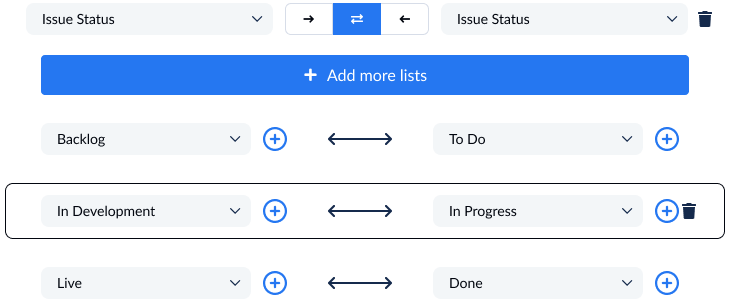
For example, you can map ServiceNow’s Incident State field to Jira’s Status field. This achieves two things:
- When Unito automatically creates a work item in one tool to match the item in the other, these fields are set to the right option. A Jira issue created to match a ServiceNow record will have its Status set to To-Do if that option is mapped to an equivalent To-Do Incident State in ServiceNow.
- Unito will automatically update the field in one tool to match the field in the other as you work. If you change the Incident State in a ServiceNow record from To-Do to Blocked, for example, Unito might switch the Status field in the matching Jira issue from Backlog to Blocked. Essentially, this mapping allows you to match progress in Jira to progress in ServiceNow.
The values don’t need to match exactly for this to be the case. You could match a “To-Do” status in Jira to “Blocked” in ServiceNow, representing the fact that records in ServiceNow are blocked while development work happens in Jira.
Step 5: Launch your ServiceNow-Jira integration
That’s it! You’re ready to launch your flow. Unito will automatically keep ServiceNow records and Jira issues in sync. This will allow your teams to collaborate more effectively without copying and pasting data or jumping back and forth between tools.
Looking to connect ServiceNow with Jira Service Management instead? Take a look at our ServiceNow and Jira Service Management guide.
FAQ: ServiceNow-Jira integration
Does Jira integrate with ServiceNow?
You can integrate Jira with ServiceNow in a number of ways:
- The Jira Spoke in the ServiceNow Integration Hub, which is available with ServiceNow at an extra cost.
- Script-based integration tools like the Exalate app, which require some level of technical knowledge to work best.
- Two-way sync integration platforms like Unito, which automatically sync data back and forth between Jira and ServiceNow.
Does ServiceNow integrate with Jira for free?
Some integration platforms like Zapier have free options for integrating ServiceNow and Jira, but they typically only support a few actions or a few work items. For complex, enterprise-grade workflows, free integrations aren’t going to cut it. ServiceNow’s built-in integrations require either a Professional Enterprise plan, and the integration for Jira is a premium add-on.
Can I sync ServiceNow tickets with Jira work items?
Yes, you can sync ServiceNow tickets with Jira work items. The most popular ways of doing this include:
- ServiceNow’s Integration Hub: ServiceNow has built-in integrations called Spokes, one of which can sync Jira work items with ServiceNow tickets.
- One-way automation: Tools like Zapier allow you to create one-way automations between ServiceNow and Jira that create new work items to match the ones you create manually or update a single field. You can chain these automations to handle more complex workflows.
- Two-way sync: A platform like Unito builds two-way relationships between work items in Servicenow and Jira, moving updates back and forth between them as you work. These are usually best for maintaining seamless collaboration between tools.
Can non-technical teams set up a ServiceNow-Jira integration without IT?
That depends on the type of integration you use. ServiceNow’s Integration Hub has prebuilt integration templates that can be deployed relatively easily by non-technical teams, but any customization beyond that will usually require IT involvement. One-way automations are easy to build and deploy, but chaining them for more complex workflows creates maintenance and troubleshooting requirements best left to technical teams. Two-way platforms like Unito are best-suited to non-technical teams, since they don’t need any IT involvement to deploy.
How long does it take to set up a ServiceNow-Jira integration?
Depending on the integration method you use, setting up a ServiceNow-Jira integration can take anywhere from minutes to months. The deployment time for an integration generally depends on how technical it is and how much troubleshooting and maintenance it requires.
When should you use Jira vs. ServiceNow?
While Jira and ServiceNow have some similarities, they’re used very differently. ServiceNow is typically the hub for an organization’s service workflows, whether that’s ITSM (IT service management) or customer service.
Jira allows teams to manage service workflows as well (especially through Jira Service Management), but it’s best suited to product work and project management. That’s why most organizations will use both tools.
What integrations are supported by ServiceNow?
Through the ServiceNow Integration Hub and third-party apps, ServiceNow offers over 1,000 integrations.
How does Unito handle ServiceNow state to Jira status mapping?
Unito’s field mappings use a visual interface with dropdowns to match ServiceNow states with Jira statuses. You can pair individual statuses in Jira with ServiceNow states without writing scripts, and the statuses don’t have to match to be mapped.
Does Unito support custom ServiceNow fields and tables?
Yes. Every ServiceNow field is technically a custom field, and Unito supports a wide range of them. Unito works with any ServiceNow table, not just incidents.
What’s the difference between Unito and the ServiceNow Jira Spoke?
ServiceNow’s Jira Spoke requires some level of technical knowledge, whether you’re building or maintaining integrations. You also will only be able to pair ServiceNow and Jira. Unito is a standalone platform that’s easy to use and no-code. It also supports over 60 integrations, allowing you to use the same platform to pair ServiceNow and Jira, ServiceNow and GitHub, Jira and Trello, and more.