







Jira Service Management two-way connector
Two-way sync between Jira Service Management and everything else.
Unito connects Jira Service Management with 60+ tools through secure, enterprise-grade, no-code integrations. Sync work information, deadlines, and more - both ways.
Experience two-way sync for Jira Service Management
Unito allows us to use the right project management and development tools so our teams can do their work without changing how they work.
True two-way live sync, out of the box
Fully configurable, no coding required
Scale and extend based on your needs
Sync Jira Service Management with business-critical tools
Popular Integrations
More Tools
















































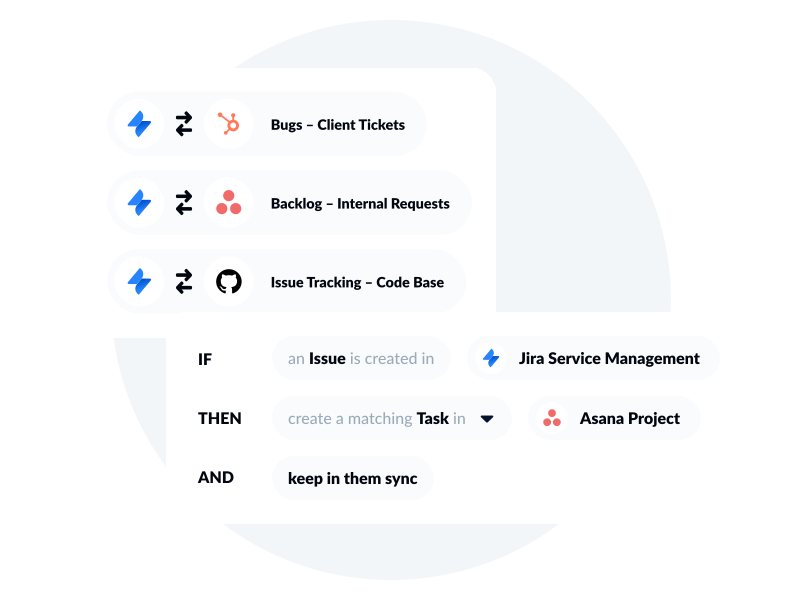
Features that bring your Jira Service Management workflows to the next level
Hierarchy sync
Sync full hierarchies — including tickets, requests, incidents, problems, changes, and their subtasks — across tools, so your service structure stays intact no matter which platform you're working in.
Lookup fields
Sync the relationships behind your tickets and issues —filter by fields on linked objects like organizations or request types so only the right records flow to connected tools.
Custom field and labels
Sync custom fields, labels, tags, and other metadata across tools to maintain consistency in context and align workflows.
Comment support
Sync public and private comments to tools that don't natively support the distinction. Use Unito rules to control which comments sync and where they surface.
Key features
See how teams succeed with Unito
-

"Without a unified solution, we were spending as much time managing tools as we were working on the projects themselves"
-

"Unito allows our pipeline to run seamlessly from Sales to Engineering, while ensuring everyone is on the same page in Salesforce and Jira."
-

"Unito grants more visibility to executives and project managers. Syncing Jira and Wrike provided more clarity in our reporting and enables collaboration between teams."
-

"We saved more than 40 hours a week after syncing Asana and Jira through Unito. Our engagement with the C-suite was far, far better than expected."
-
"We're not just saving on licensing costs - we're reallocating time and resources. Tasks that used to take hours are now automated."
-

"Unito allows to have the right project management tool and the right development tool so our teams can do what they need to do without changing the way they work."
Real-world ways Unito simplifies integrations
Align projects across tools
Sync work with PM tools like Asana or Smartsheet to streamline collaboration and align project across teams.
Connect Jira Service Management with
Bridge planning and development
Connect with Jira or Azure DevOps to break down silos between planning and execution and keep delivery on track.
Connect Jira Service Management with
Streamline support collaboration
Integrate with support tools to share ticket updates with project and business teams - improving responsiveness and cross-functional workflows.
Connect Jira Service Management with
Power AI agents with complete context
Feed AI agents with real-time data and full business context by connecting tools across ITSM, DevOps, and business operations.
Connect Jira Service Management with
Enterprise-grade control and reliability
Unito is designed to meet the highest standards of security and performance.
SOC 2 Type 2 certified
GDPR and CCPA compliant
- SSO
- End-to-end encryption
- Access controls and flow permissions
- Centralized monitoring tools
- No data stored by Unito